

HDMI RX
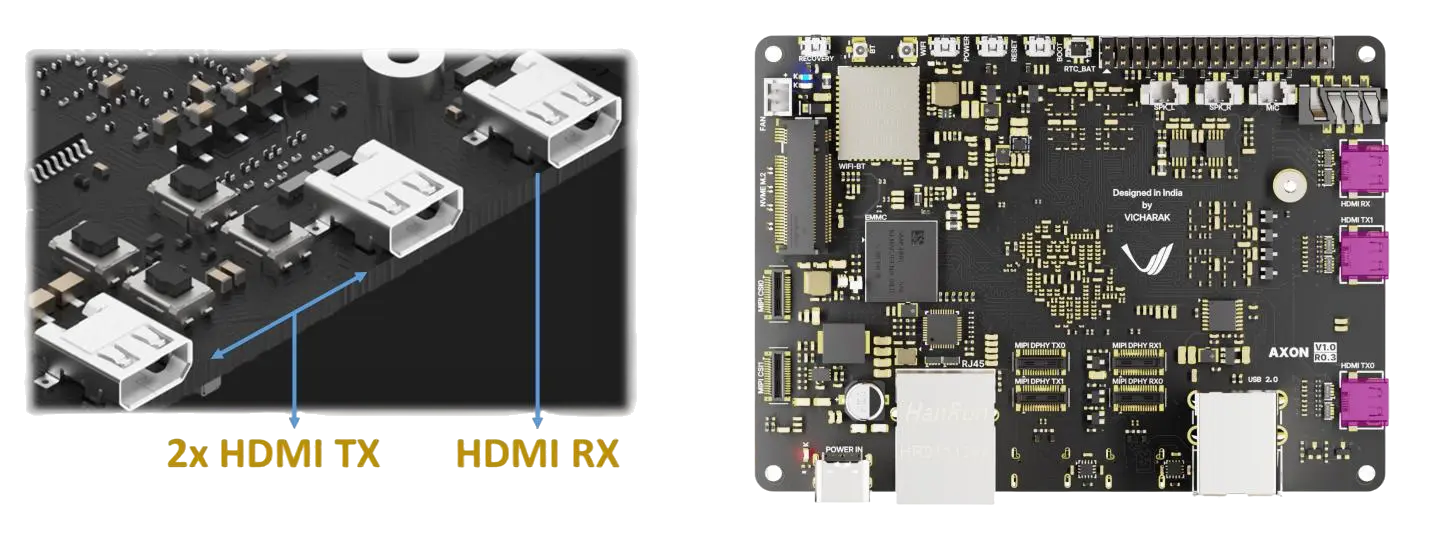
The HDMI RX (Receiver) port on Axon allows you to capture video input from HDMI sources. This documentation covers how to set up and receive video data using two Axon boards and the V4L2 (Video4Linux2) tool.
Note
Instead of using another Axon board as a video source, you can use any other source. This page shows how to connect two Axon boards.
Getting Started
Prerequisites
2x Axon boards (one as TX/transmitter and one as RX/receiver)
2x HDMI cables
Mini-HDMI to HDMI converter
Hardware Setup
Connect the Boards
Connect the HDMI TX output from the first Axon board (TX board) to Mini-HDMI to HDMI converter then connect HDMI RX input of the second Axon board (RX board) to it.
Power on both boards
Ensure both boards are running and have network connectivity
Receiving the data
Verify HDMI RX Detection
SSH into the RX Axon board:
ssh root@<RX-BOARD-IP>
Install v4l2 tools
sudo apt install v4l-utils
Check if the HDMI RX port is detected:
v4l2-ctl --list-devices
You should see output listing the HDMI RX device (typically
/dev/video0or similar):
rk_hdmirx (fde0000.hdmirx-controller):
   /dev/video0
You can get more info about connected device by :
v4l2-ctl -d /dev/video0 --all
Receiving Video Data with V4L2
Note
You can either use qv4l2 (the official V4L2 GUI tool) to detect devices and view the video or use the terminal. Both methods are explained below.
Using qv4l2(GUI Tool)
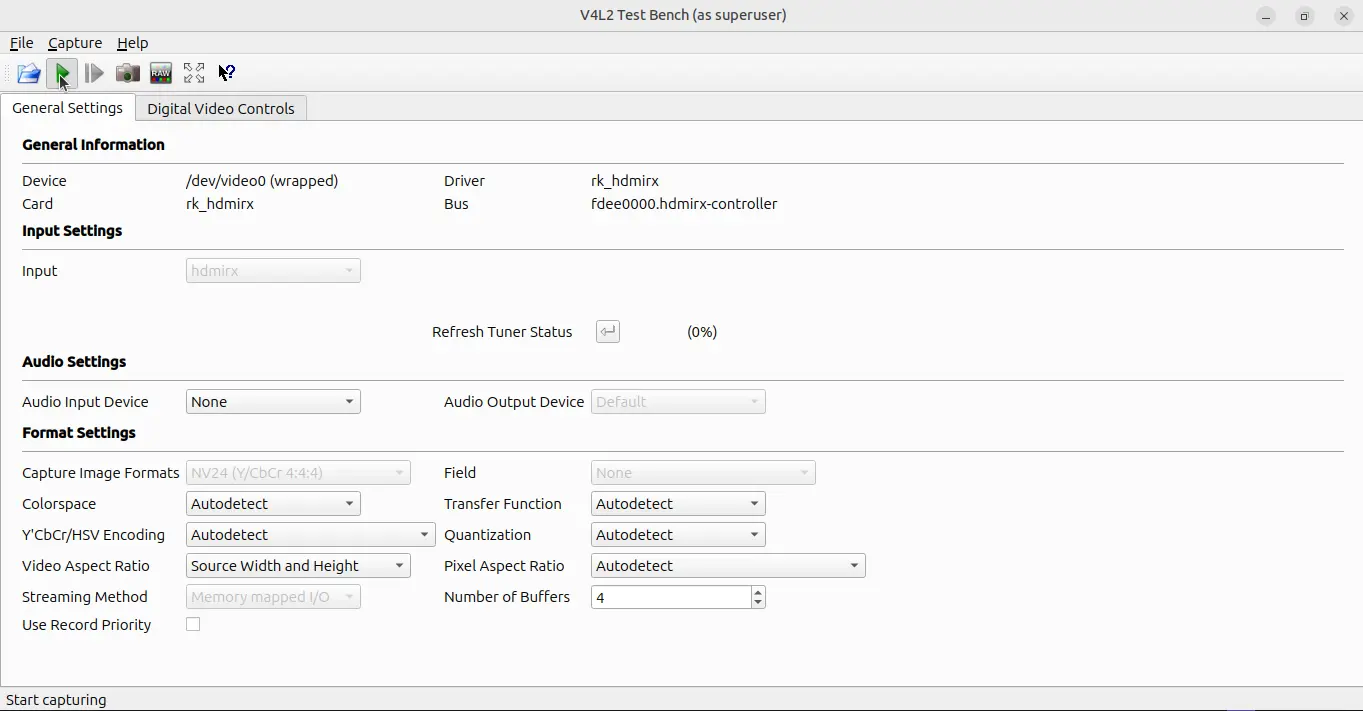
Step 1: Install the GUI tool (qv4l2) on RX Axon
sudo apt install qv4l2
Step 2: Open qv4l2
qv4l2
Step 3: Click the ‘Start Capturing’ button as shown below
Using Terminal
Step 1: Verify Supported Formats
Check the available video formats and resolutions supported by the HDMI RX:
v4l2-ctl --device=/dev/video0 --list-formats-ext
Example output:
ioctl: VIDIOC_ENUM_FMT

Type: Video Capture Multiplanar

[0]: 'BGR3' (24-bit BGR 8-8-8)
[1]: 'NV24' (Y/CbCr 4:4:4)
[2]: 'NV16' (Y/CbCr 4:2:2)
[3]: 'NV12' (Y/CbCr 4:2:0)
Step 2: Detect Input Signal
Check if a video signal is being received:
v4l2-ctl --device=/dev/video0 --get-fmt-video
You should see information about the detected input resolution and format:
Format Video Capture:
  Width/Height      : 1920/1080
  Pixel Format      : 'UYVY'
  Field             : None
  Bytes per Line    : 3840
  Size Image        : 8294400
  Colorspace        : Default
  Transfer Function : Default
  YCbCr/HSV Encoding: Default
  Quantization      : Default
Step 3: Capture Video Stream
Use V4L2 to capture and save the video stream:
v4l2-ctl --device=/dev/video0 --stream-mmap --stream-count=100 --stream-to=capture.yuv
This command:
--device=/dev/video0: Specifies the HDMI RX device--stream-mmap: Uses memory-mapped I/O for efficient streaming--stream-count=100: Captures 100 frames--stream-to=capture.yuv: Saves the captured video to a file
Step 4: View Captured Video
Convert and view the captured YUV data using ffmpeg (if installed):
ffplay -f rawvideo -pixel_format uyvy422 -video_size 1920x1080 -framerate 60 capture.yuv
Or save as a video file:
ffmpeg -f rawvideo -pixel_format uyvy422 -video_size 1920x1080 -framerate 60 -i capture.yuv output.mp4
Common V4L2 Commands
Command |
Description |
|---|---|
|
List all V4L2 devices |
|
List supported video formats and resolutions |
|
Get current video format and resolution |
|
Set specific video resolution |
|
Capture N frames from the HDMI RX input |
Troubleshooting
No HDMI RX device detected
Verify the HDMI cable is properly connected to both boards
Ensure the TX board is actively transmitting a video signal
Check if the HDMI RX driver is loaded:
lsmod | grep hdmirxReboot the RX board if the device is not detected
No signal detected in v4l2-ctl
Confirm the TX board is sending video data
Check HDMI cable connectivity
Try resetting both boards and reconnecting
Verify the HDMI source resolution is supported by Axon
Cannot capture video or corrupted data
Ensure both boards have adequate power supply
Try capturing fewer frames first (
--stream-count=10)Check if the pixel format is correct
Verify network connectivity if using remote access
Note
The HDMI RX input resolution is detected automatically from the incoming signal. The supported resolutions depend on the HDMI TX source and board capabilities up to 4K resolution.